How to Check Your UAE Visa Status and Expiry Date Online in 2026
Check your UAE visa status online in seconds. Step-by-step guide for GDRFA Dubai and ICP platforms. Find file number, expiry date and validity free.
By Vadim Kouznetsov, published

Not sure if your UAE visa is still valid? Whether you’re a resident checking your own status, monitoring dependent visas during a job change, or simply want to know your expiry date, UAE immigration authorities provide free online services that display your visa details in seconds.
The process varies depending on which emirate issued your visa. Here’s exactly how to check.
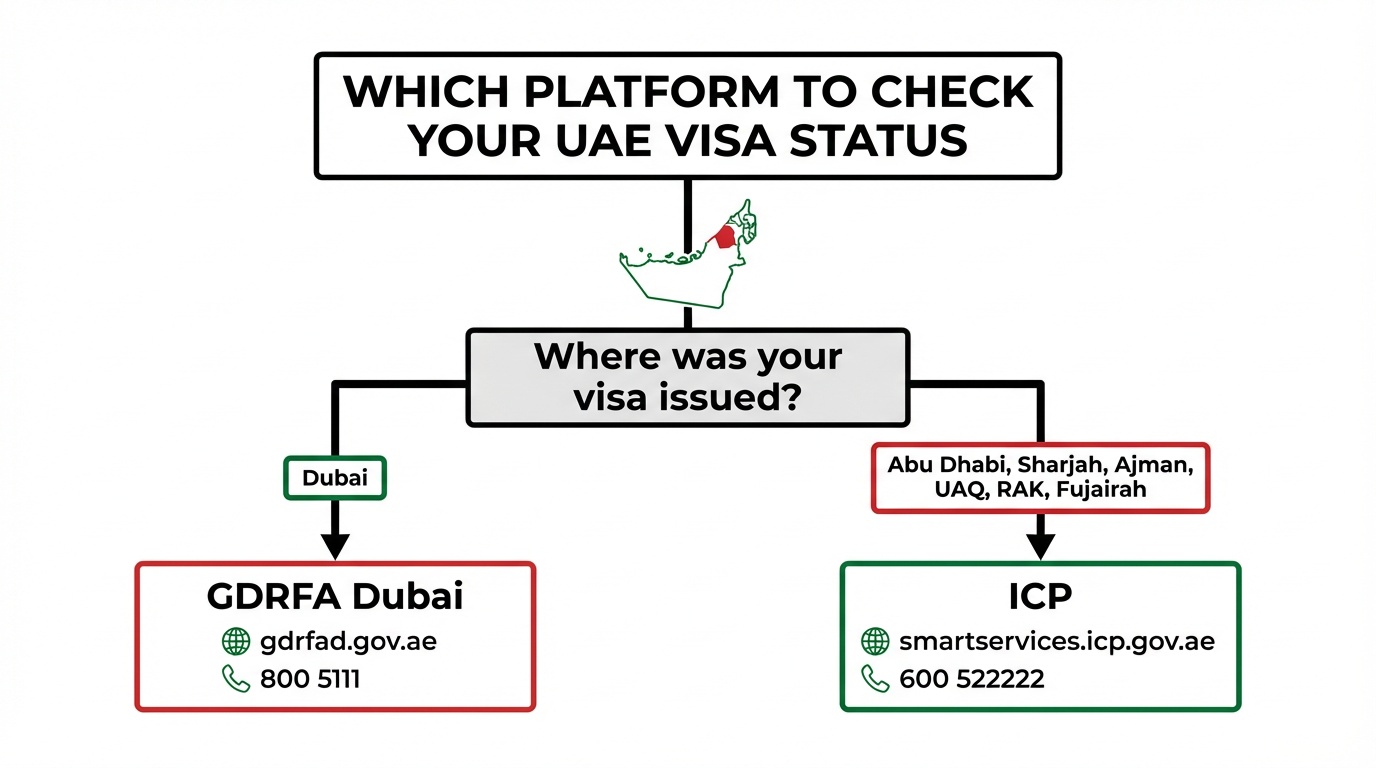
Which Service Should You Use?
Your visa-checking method depends on where your visa was issued:
Dubai-issued visas: Use the General Directorate of Residency and Foreigners Affairs (GDRFA) Dubai website
All other emirates (Abu Dhabi, Sharjah, Ajman, Umm Al Quwain, Ras Al Khaimah, Fujairah): Use the Federal Authority for Identity, Citizenship, Customs and Port Security (ICP) platform
If you’re unsure which emirate issued your visa, check the stamp or e-visa document. The issuing authority is printed on all UAE residence visas and entry permits.
How to Check Dubai Visa Status Online (GDRFA)
If your entry permit or residence visa was issued in Dubai, follow these steps:
Step 1: Visit the GDRFA website (gdrfad.gov.ae) and select the visa status service from the homepage.
Step 2: Choose your search method:
- Application number (for recent applications still processing)
- File number (for issued visas)
- Over-the-counter service applications
- Special requests
- Establishment (for company PROs checking employee visas)
Step 3: Enter the required details.
For file number searches, you’ll need:
- First name (as shown on visa)
- File number
- Nationality
- Date of birth
Your file number appears on your UAE residence visa document. You can also find it via UAE Pass.
Step 4: Complete the Captcha verification.
Step 5: Click Search.
Your visa status, issue date, and expiry date will display immediately.
Need assistance? Contact an Amer centre:
- Inside UAE: 800 5111
- Outside UAE: +971 4 313 9999
For those managing multiple visas through company accounts, the GDRFA residency platform offers bulk visa status checking for establishments.
How to Check Visa Status for Other Emirates (ICP)
If your visit or residence visa was issued in Abu Dhabi, Sharjah, Ajman, Umm Al Quwain, Ras Al Khaimah, or Fujairah, use the ICP platform:
Step 1: Visit the ICP online services platform (smartservices.icp.gov.ae).
Step 2: Select Public Services from the menu, then click File Validity.
Step 3: Choose your search method:
- File number
- Passport information
Step 4: Select your visa type:
- Residency (for residence visas)
- Visa (for visit visas)
Step 5: Enter one of these details:
- Unified ID number (UID)
- File number (found on visa sticker or e-visa)
- Emirates ID number (residence visas only)
- Passport number (if searching by passport information)
Step 6: Enter your date of birth.
Step 7: Complete the Captcha verification.
Step 8: Click Search.
For ICP-related enquiries, call: 600 522222
This is the same platform used for UAE residence permit applications and renewals.
What Information Will Your Visa Status Show?
Both GDRFA and ICP systems display:
- File number
- Unified ID number (UID)
- Visa file status (valid, expired, cancelled, under process)
- Visa issue date
- Visa expiry date
This information confirms whether your visa remains active and how much validity remains.
Where to Find Your File Number
Your file number is essential for visa status checks. You can find it on:
- Your residence visa stamp in your passport
- Your e-visa document (sent via email when visa was issued)
- UAE Pass app (under your residency documents)
- Emirates ID card (the UID number)
If you’ve lost track of your documents, the Emirates ID replacement process can help you recover your identification details.
When Should You Check Your Visa Status?
Regular visa status checks are useful when:
Before international travel: Confirm your visa hasn’t expired. Some airlines and immigration counters verify UAE residency status before boarding return flights.
During job changes: When changing employers, your old visa gets cancelled before the new one activates. Checking status confirms when transitions complete. Review the UAE visa grace period rules if you’re between jobs.
After visa renewal applications: Track whether your renewal has processed successfully.
For dependent visas: Monitor family member visas, especially when sponsoring parent has changed jobs or renewed their own visa.
Before major purchases: Banks and some businesses verify active residence status before approving loans, car purchases, or property transactions.
What If Your Visa Is Expired or Cancelled?
If the status check reveals an expired or cancelled visa:
Within grace period: You typically have 30 days (standard visas) or up to 180 days (Green Visa holders) to either renew, find new sponsorship, or exit the UAE.
Overstayed: Contact ICP or GDRFA immediately. Overstay fines apply daily, but authorities can advise on regularisation options.
Cancelled without your knowledge: This can happen if employers fail to notify you. Contact your previous sponsor and immigration authorities to clarify your status.
For those who’ve been outside the UAE for extended periods, check whether your visa remains valid using the return permit guide.
Can You Travel With an Expired Emirates ID but Valid Visa?
Yes. Your UAE residence visa permits international travel even if your Emirates ID renewal is processing. Carry your Emirates ID application form as proof of renewal.
The visa—not the Emirates ID—determines your right to re-enter the UAE. However, you’ll need a valid Emirates ID for most domestic services.
Key Takeaway
Check your UAE visa status online in seconds using GDRFA (gdrfad.gov.ae) for Dubai-issued visas or ICP (smartservices.icp.gov.ae) for visas from other emirates. You’ll need your file number, Emirates ID number, or passport details plus your date of birth. The system displays your visa validity status, issue date, and expiry date immediately. For Dubai enquiries call 800 5111; for ICP enquiries call 600 522222.
FAQs
How do I check my UAE visa status online for free?
For Dubai visas, visit gdrfad.gov.ae and use the visa status service with your file number or application number. For visas issued in other emirates, visit smartservices.icp.gov.ae, select Public Services, then File Validity. Both services are free.
Where can I find my UAE visa file number?
Your file number appears on your residence visa stamp in your passport, your e-visa document, or in the UAE Pass app under residency documents. You can also use your Emirates ID number or passport details as alternative search options.
Can I check someone else’s visa status?
Yes, if you have their file number, Emirates ID number, or passport details plus date of birth. Employers and PROs regularly check employee visa statuses through the same platforms using establishment accounts.
What does “visa file status” mean in the results?
The status indicates whether your visa is valid (active), expired (past expiry date), cancelled (terminated by sponsor), or under process (application pending). A valid status means you can legally remain in the UAE.
How often should I check my UAE visa status?
Check before international travel, after submitting renewal applications, during job changes, and whenever you need to verify your residency for banking or government services. There’s no cost or limit to status checks.
Further Reading
The UAE week, every Monday
The week's stories on jobs, visas, money and daily life in one short email. Unsubscribe in one click.